Make a Photo or Vertical Video With Sheru Bhai AI

This page is unofficial and fan-made.

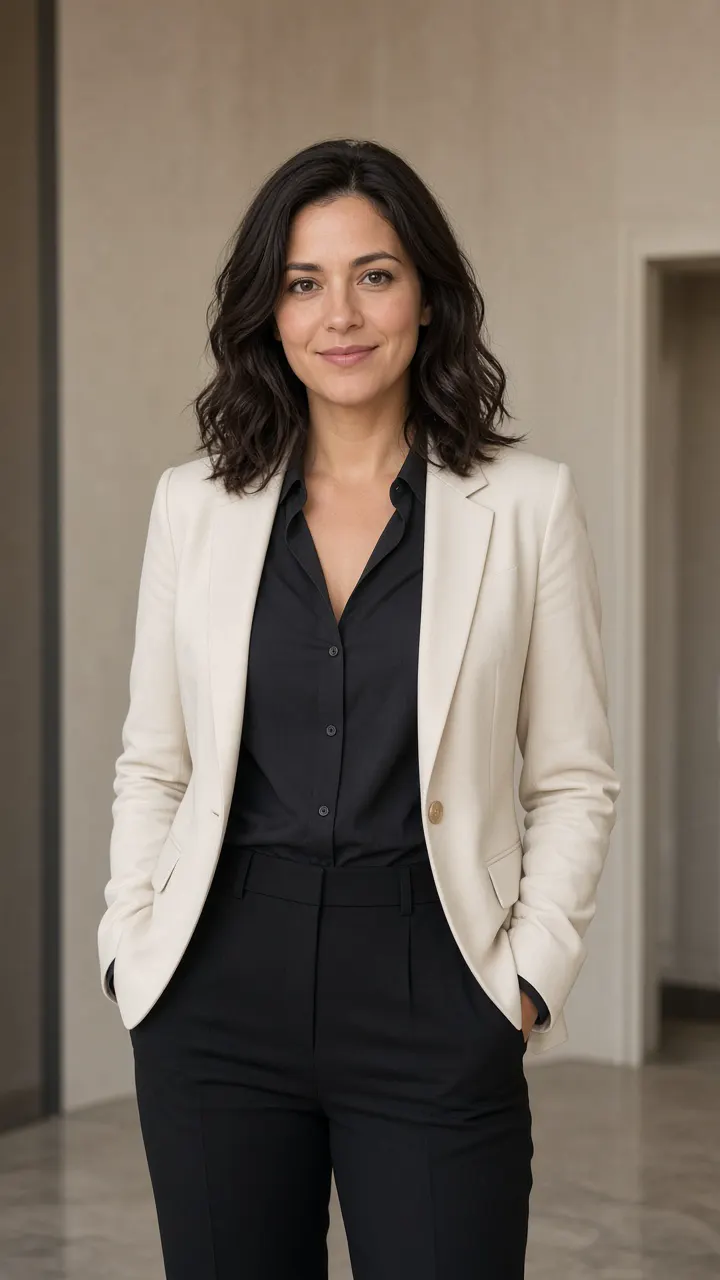
AI-made sample — Source portrait
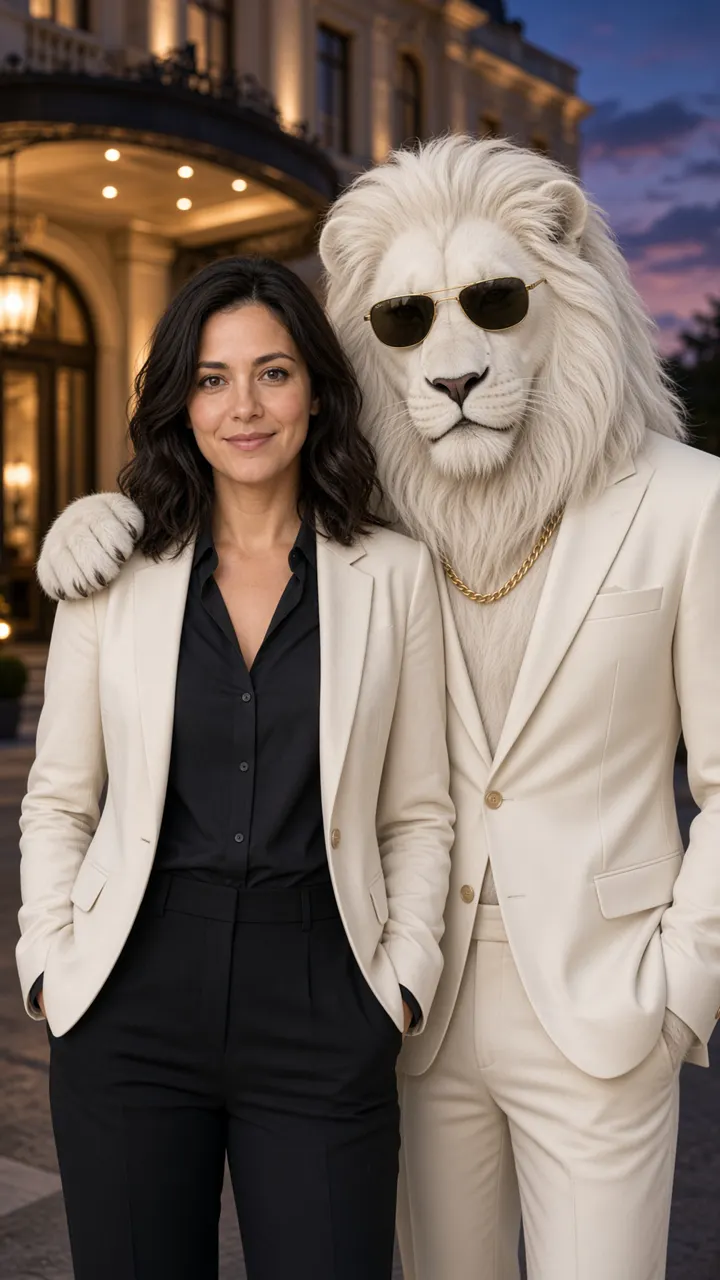
AI-made sample — Stand-beside still
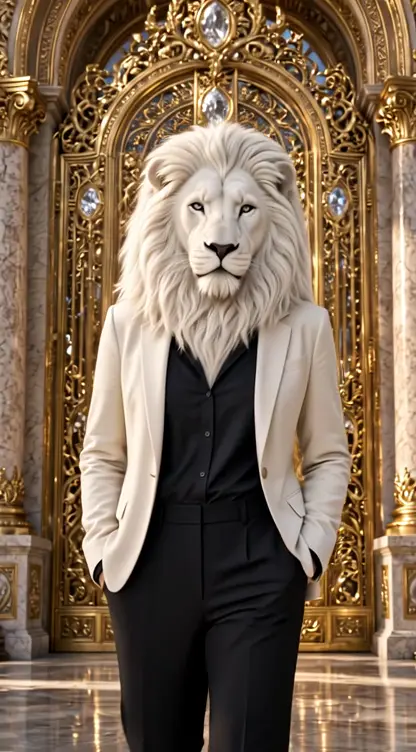
AI-made sample — Entrance walk at a palace gate
Choose a scene
Background

3 credits per photo

AI-made sample of a synthetic adult beside a fictional lion-headed character; not a real person or official material

AI-made sample — not your file

You can make a sheru bhai ai photo or a short sheru bhai ai video from one picture of yourself. This page is unofficial and fan-made. The figure in a Sheru Bhai AI result is a fictional lion-headed character in a white suit, not a real person and not an official mascot. Upload a clear picture of an adult who agreed, choose a look, and generate a finished still or clip you can download.

Sheru Bhai AI keeps both formats in the same tool, with the same source photo and the same scene. This look spread as short vertical stills and clips of a confident lion-headed figure in a luxury suit. Sheru Bhai AI is built for that job: one upload, a scene you pick, and a file you can take with you.

What you can make in this Sheru Bhai AI tool

A downloadable sheru bhai ai photo

When you choose photo mode, you get a finished sheru bhai ai photo, not a temporary preview. You can save it as a story frame, a profile picture, or the opening frame of a Reel. Review the face, the outfit, and the character before you post it.

Short sheru bhai ai videos in 480p, 720p, or 1080p

When you choose video mode, you get a short sheru bhai ai video of the same look. The default output is 480p. If you want a sharper file, you can choose 720p or 1080p. The clip sits in a 9:16 frame for Reels, Shorts, or Stories. The clip is generated with an audio track, and you cannot turn the sound off. Keep any spoken line brief, polite, and free of insults.

Switch between photo and video in the same place

In Sheru Bhai AI you pick Photo or Video at the top of the tool, keep the same upload, and choose a scene. If you already made a sheru bhai ai photo and later want motion, switch to video. If you only want a still, stay in photo mode and download the picture.

How to create your look

Follow the steps below in Sheru Bhai AI, from the source photo to the finished file.

Use a clear photo of an adult who agreed

Sheru Bhai AI should only receive a photo of you, or of an adult who clearly agreed. Do not upload a child's picture, a celebrity, or anyone who has not said yes. A front-facing picture with even light and a visible face works better than a group shot or a heavy filter. If you want the lion-headed boss look, include the body and the clothes, at least from the knees up.

Choose a photo or a video

Open the tool and switch to the format you want. The same source picture is used in either mode. Choose a sheru bhai ai photo for a still you can post as a cover. Choose a sheru bhai ai video for a short 480p, 720p, or 1080p clip, with simple motion such as a step forward.

Pick a scene and generate the file

After you pick a scene and a background, confirm that the photo is of an adult who agreed, then generate the file. Sheru Bhai AI returns a downloadable result when it finishes. If the face or the mane looks wrong, try a clearer source picture. If a run fails, the reservation for that run is returned.

Choose a scene

Sheru Bhai AI offers two still or video looks in this version, with a third play left for later.

Stand beside the lion character

One Sheru Bhai AI scene places you next to the fictional character, as if you were standing with a sharply dressed friend. The character has a lion's head and mane, a human-like body, a white or ivory suit, dark sunglasses, and simple gold accessories. A paw may rest lightly on your shoulder. Your face, hairstyle, and skin tone should stay close to your photo. Leave space on the side where the character will appear, and avoid a hat that collides with the mane.

AI-made sample — Stand-beside still

Appear as the lion-headed boss

The other Sheru Bhai AI scene keeps your body, pose, and clothes, and replaces the head with a white or golden lion head. Your own face does not appear. The look is a costume, not a portrait that still shows your features. Use a standing photo with the outfit visible, then check that the head sits on the shoulders and the clothes still match.

AI-made sample — Entrance walk at a palace gate

Choose a background and an entrance walk

In Sheru Bhai AI you can keep the default setting, or pick a palace gate, a supercar driveway, or a marble hall for either a photo or a video. In video mode you can keep the simple step-forward motion, or choose an entrance walk: a slow walk toward the camera, a glance back over the shoulder, a collar or suit adjustment, and a steady look at the lens.

Auction-style clips come later

Some people want a longer comic auction scene, with bidding lines and a rival. That play is not part of this version of Sheru Bhai AI. You can still make a still or a short entrance-style clip in Sheru Bhai AI today.

AI-made samples from this tool

The files below are unofficial, AI-made samples from Sheru Bhai AI. They were made from a synthetic adult portrait, not from a photo of a real person we know. Use them to see the stand-beside still and the lion-headed boss clips before you generate your own file.

Compare the source photo and a finished still

The first picture is the source still. The second is a finished sheru bhai ai photo in the stand-beside look. Both are AI-made samples.

AI-made sample of a synthetic adult source portrait; not a real person or official material
AI-made sample — Source portrait
AI-made sample of a synthetic adult beside a fictional lion-headed character; not a real person or official material
AI-made sample — Stand-beside still

Two short sheru bhai ai videos

One sheru bhai ai video uses the simple step-forward motion. The other uses the entrance walk at a palace gate, with the lion-headed boss look. Play either clip with the controls; they do not start on their own.

AI-made sample — Simple step-forward motion
AI-made sample — Entrance walk at a palace gate

Sheru Bhai AI prompt examples you can reuse

The examples below describe a fictional, unofficial character. They do not copy anyone's video, audio, or wording. Use these sheru bhai ai prompt lines as a starting point, and keep the identity lines if you want the face or the outfit to stay yours.

Stand beside the character (still). Use my uploaded photo as the identity reference. Create a realistic vertical 9:16 portrait of the same adult beside a fictional white lion-headed character in an ivory suit, dark sunglasses, and a simple gold chain. Keep my face, hairstyle, and skin tone faithful to the photo. Pose us like friends, with one paw on my shoulder, outside a hotel at dusk. No readable text, logos, or extra people.

Lion-headed boss (still). Use my uploaded photo as the only reference for my body, pose, and clothes. Keep my build and outfit, and replace only the head with a white lion head and mane. Place me in a palace hall, facing the camera, in a vertical 9:16 frame. Do not show my human face. No readable text or logos.

A sheru bhai ai video prompt. Start from this still, in 9:16. Over a short clip, I take one slow step toward the camera, glance aside, then face forward and hold the pose. Keep the character, clothes, and background consistent. If there is speech, use one short, polite line. No insults or on-screen text.

If you need a fix, change only one thing, such as the background. That is easier for Sheru Bhai AI to follow than a long list of new demands.

Tips that help the face and the outfit stay clear

Sheru Bhai AI can only work with the face and the clothes you give it. Use one adult in the frame, facing the camera, in even light. Show the outfit when you want the lion-headed look. Skip heavy filters, dark crops, and group photos. If the mane sits too high or too low, try a straighter standing photo.

Review the hands, the shoulders, and the edge of the jacket before you post a Sheru Bhai AI file. If something feels off, do not publish it. Treat a Sheru Bhai AI result as an AI-made, unofficial picture or clip, not as a real meeting with a public figure.

An unofficial, fan-made character

Sheru Bhai AI is an unofficial, fan-made tool. It is not affiliated with, endorsed by, or sponsored by any original creator, studio, or app. The character description on this page was written for Sheru Bhai AI. It does not use someone else's video, audio, or face, and it does not claim to be an original clip from Instagram or YouTube.

The name in Sheru Bhai AI is used only to describe a look you can recreate with your own adult photo. If you hold rights in a related character or clip and have a concern, use the contact page. Only use a picture of yourself or of an adult who agreed, and label the file as AI-made when you post it.

Questions about this tool

What is Sheru Bhai AI?

Sheru Bhai AI is an unofficial, fan-made tool that turns one adult photo into a finished still or a short vertical video in the lion-headed formal look. It is not an official app.

Can I make a sheru bhai ai photo and a video here?

Yes. You can switch between photo and video in the same tool. A sheru bhai ai photo is a finished still. A sheru bhai ai video is a short clip at 480p by default, or 720p or 1080p if you choose a sharper option.

What kind of photo should I upload?

Use a clear, well-lit picture of one adult, with the face visible. For the lion-headed look, a standing photo that shows the clothes works better. Sheru Bhai AI cannot invent a clean face from a blurry crop.

Can I use someone else's photo?

Only if that person is an adult and has agreed. Do not upload a child's picture, a celebrity, or a photo you were not allowed to use. Sheru Bhai AI is meant for your own picture, or one you were given permission to use.

Is this an official Sheru Bhai app?

No. This is unofficial and fan-made. Sheru Bhai AI is not endorsed by any original creator or platform. The character is a fictional description written for the tool.

What do sheru bhai ai videos look like?

They are short vertical clips, 9:16, at 480p by default, with optional 720p or 1080p. Motion is simple, such as a short walk-in, and the clip includes an audio track.

Do I need a new file if I already made a sheru bhai ai photo?

Not for the source picture. Keep the same upload in Sheru Bhai AI, switch to video, and generate a clip from that look.

How do I use a sheru bhai ai prompt?

Copy one of the prompt examples on this page, or start from the sheru bhai ai video prompt if you want motion. Change only one detail at a time, and keep the lines that lock your face or your outfit.

What happens if generation fails?

If a run fails, the reservation for that attempt is returned, and you can try again. If the face or the mane looks wrong in a finished file, try a clearer photo.
Sheru Bhai AI is ready when you have one adult photo and a scene in mind. Choose a still or a short video, generate the file, and review it before you share it.